
Engineering guidance, not a report of client results. Code fragments illustrate architecture and require testing before use.
Practical guidance using a fictional repair-business workflow and conceptual images. Vendor capabilities and survey findings are attributed; no Alector Lab client outcome is claimed. Source review: .
The moment the caller asks for a person
“Can I speak to someone?”
The caller needs to move a repair appointment. They have already explained why, and the AI receptionist has offered two times that do not work. Now they want a person. If the agent repeats the same choices or sends them to a dead end, answering the phone has not helped.
Let the agent handle what it can actually finish. When it cannot make progress, let the caller reach a person without starting over. That means passing along the request, what the agent checked, and what still needs a decision.
Phone systems are beginning to support this. Aircall says its voice agents can look up customer context and take actions in Salesforce during a call. Zendesk says its voice agents can transfer a caller with the conversation history attached to a ticket. Those features are useful starting points. Each business still needs to check what its staff actually receives when the phone rings.
Callers want to know they can reach someone when they need to. In a February–March 2026 survey of 3,566 B2B and B2C customers, Gartner found that 87% considered access to a human essential when a company uses generative AI for customer service. That is a survey result, not a forecast for any one business, but it is a good reason to make the route to a person clear.
What should the AI handle, and when should it step aside?
Imagine a repair shop on a busy morning. Staff are helping walk-ins and coordinating technicians while an AI receptionist answers the phone. It can take a routine request as far as its access and authority allow. The point is to get the caller to a real outcome.
| Caller says | The agent can | Hand over when |
|---|---|---|
| “Can I book a service?” | Check available times, confirm the address and service, and book a slot the calendar accepts. | No suitable time exists, key details are unclear, or the caller asks for a person. |
| “I need to change tomorrow's visit.” | Find the booking, check alternatives, and save a change only if the scheduling system accepts it. | The change affects a promised arrival window, technician, or other exception the agent cannot approve. |
| “The repair did not fix the problem.” | Record the issue and job reference so the right person can pick it up. | Someone needs to review the work, handle a complaint, or make a judgment about safety or next steps. |
These are examples, not a description of any deployed product. The rules should reflect the business's own services, staffing, and booking policies.
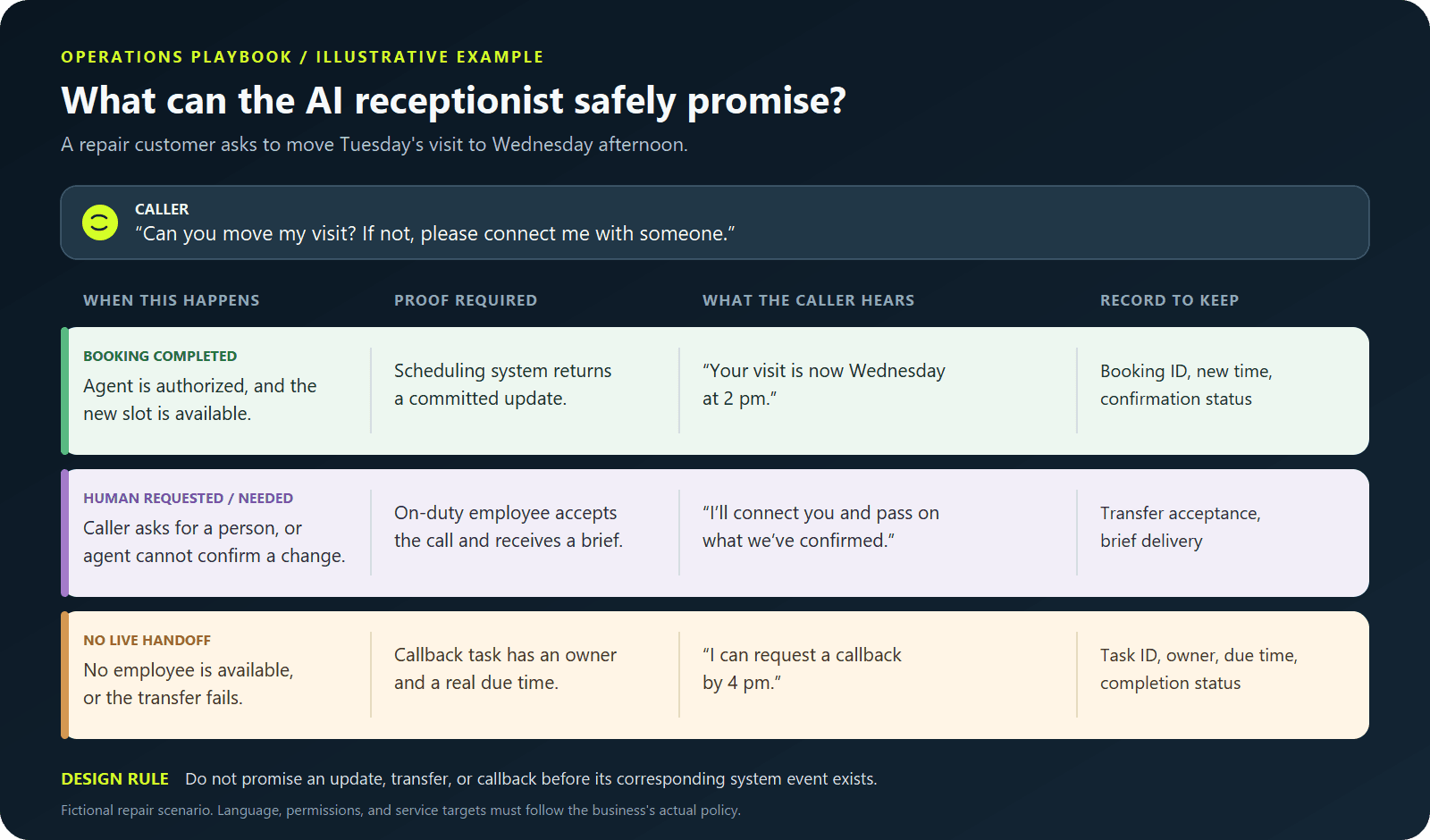
There is a small but important difference between understanding a request and completing it. If the calendar has not accepted a new slot, the agent should say, “I haven't changed your appointment yet.” It should never say “You're rebooked” on the strength of a fluent conversation alone.
Give the next person enough to pick up the call
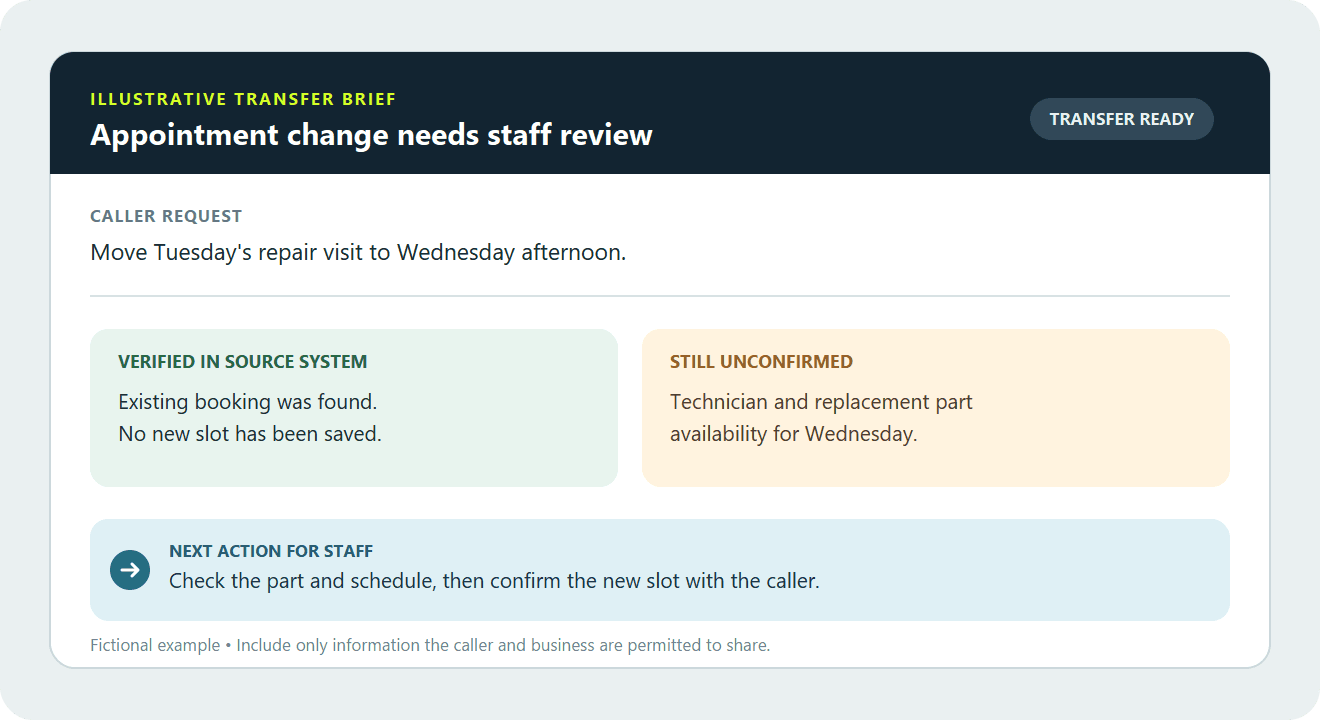
The employee taking over does not need to read a whole transcript before saying hello. A short brief should tell them:
- Who is calling: Only include identity details the business has verified.
- Why they called: Put the request in one plain sentence.
- What the agent did: Show the booking it found, choices it offered, and actions the system confirmed.
- What remains open: Say plainly what is uncertain or still needs approval.
- What happens next: Name the team or person responsible, including a callback request if there is one.
For example: “Caller wants to move Tuesday's repair visit. We found booking ending 4821, but no new time has been saved. Wednesday afternoon works for the caller if the technician can bring the replacement part. Please check both before confirming.” The employee can start with the decision that remains, instead of asking the caller to tell the whole story again.
Tell the caller what happens next
Be explicit: “I'll connect you with our team and pass on what you've told me.” If nobody is available, say so and offer a callback the team can actually make. Create the task in a queue someone owns. A promise to call back should not disappear when the call ends.

When should it stop and hand over?
Give the agent clear reasons to stop trying to solve the call itself. For example:
- The caller asks for a person.
- The booking system will not confirm the action the caller needs.
- The caller has corrected the same important detail more than once.
- The request needs an exception or decision the agent is not allowed to make.
- The caller raises a safety concern or an urgent issue covered by the business's escalation policy.
- The caller is upset and the conversation is going in circles.
The caller should not have to know a magic phrase. Gartner warns that making people go through repeated unsuccessful AI interactions can make them less willing to use the service again. Zendesk's 2026 customer-experience research likewise reports frustration with having to repeat a story to different agents. Those findings cover broad customer-service settings; the rules above are a starting point for an appointment business to test.
Make a few test calls before going live
Use a normal phone, not just a browser demo. Try these calls with some background noise and interruptions:
- Book a simple appointment. Does the confirmation match the calendar?
- Change a booking, then change your mind mid-sentence. What was actually saved?
- Ask for a person at the start, then on another call halfway through. Does the transfer work, and what does the employee see?
- Call after hours. Does the callback request reach someone who can act on it?
- Ask for an exception the agent cannot approve. Does it stop short of making a promise and follow the right escalation route?
For each call, note what was completed, whether a transfer or callback worked, what the caller had to repeat, and whether the agent confirmed anything incorrectly. If a test fails, record why: perhaps no one was available, the summary missed a key fact, or the booking action failed. That tells the team what to fix. A pleasant-sounding call only counts as resolved when the requested action is done.
Measure the outcome, not just the answered call
“Calls answered” tells you the phone was picked up. It does not tell you whether a visit was booked, a person took over, or an after-hours callback happened.
The caller's test is simpler: Did I get help? If I needed a person, did they know why I called?
That is the standard to design around. If you are planning an AI receptionist, start by listing the calls it can finish and the calls your team must take. Alector Lab's VeraVoice project context describes an AI receptionist for calls and appointments. Our enterprise AI agent work includes the system access, permissions, and handoff paths that make those conversations useful.
Frequently asked questions
Should an AI receptionist always offer a human agent?
Yes. During staffed hours, that may mean a live transfer. After hours, it may mean a callback request that reaches a real team member. Tell the caller which option is available.
What information should be passed during an AI-to-human transfer?
Pass the reason for the call, any verified booking details, actions already completed, and what still needs to be decided. Staff can have access to the transcript or recording if the business's data policy allows it. Make unverified details obvious.
Can an AI voice agent change an appointment by itself?
Yes, if the business allows it and the scheduling system confirms the new slot. Then the agent should read the time back and send the usual confirmation. If the system has not accepted the change, the agent should say that clearly.
How do you know whether an AI receptionist is helping customers?
Check completed bookings, successful transfers, finished callbacks, incorrect confirmations, and how often callers have to repeat themselves. Listen to a sample of calls with the right consent and access controls. The real phone experience matters more than the demo.
References
What the sources support
- 87% of 3,566 surveyed B2B and B2C customers considered access to a human essential when a company uses generative AI for customer service. Gartner newsroom report; 4 August 2026; survey conducted February–March 2026. Surveyed customers only; not a result measured for Alector Lab or an individual service business.
- Aircall says its voice agents can look up customer context and act in Salesforce during a call. Aircall product update; 22 September 2026. Vendor-described capability, not independent evidence of successful handoffs.
- Zendesk says its voice agents can transfer callers with conversation history and context attached to a ticket. Zendesk general-availability announcement; 1 September 2026. Vendor-described capability; availability and workflow quality depend on configuration.
- Zendesk CX Trends 2026 reports customer frustration with repeating a story to different agents. Zendesk CX Trends 2026; accessed 27 September 2026. Vendor research across its surveyed population; no repair-business-specific measurement is claimed.
- Gartner Survey Finds 87% of Customers Say Companies Using GenAI for Customer Service Must Provide Access to a Human Agent — Gartner, 4 August 2026
- This month in AI Voice Agents: September 2026 — Aircall, 22 September 2026
- Announcing the general availability of voice AI agents — Zendesk, 1 September 2026
- Contextual Intelligence Becomes the New Standard for Exceptional Customer Experience in 2026 — Zendesk newsroom, accessed 27 September 2026