Alector Lab / AI agents
A useful agent.next step. Give your team a practical way to find answers, prepare work, and move a process forward. Built around your workflow. Run where your business needs it.
06 focused offerings Local or cloud Quoted for your scope
Purpose-built capabilities. One connected workflow.AI-generated concept illustration Choose the work to improve
Meet your nextworking advantage. Start with one recurring task. Each offering is configured and built for your data, systems, and approval rules. Examples below are illustrative.
Where should your agent run? Your hardware. Local models and data. No required cloud calls after setup.
Knowledge Desk Turn scattered knowledge into answers your team can check.
For Internal operations, HR, and service teams
Fully local — offline/private
Answers from approved documents on your own hardware, with references back to local files.
See an illustrative example Input An employee asks: Which travel expenses need approval? The approved policy folder is supplied. Prepared output A draft answer cites the relevant policy sections, flags an outdated appendix, and asks the employee to confirm their travel category. Human review A knowledge owner approves sources. Unsupported or conflicting answers return to the team for review. Requirements & integrations A private workstation or server sized against your document volume, model, and concurrent users.
Integration scope: Local PDF, text, and document folders; controlled manual imports. Specific connectors are agreed during scoping.
Request a quote for Knowledge Desk, fully local 02 / Structure the paperwork Document Operations Move from incoming documents to structured, reviewable records.
For Finance, procurement, and document-heavy teams
Fully local — offline/private
Processes local document batches with local parsing, inference, storage, and review.
See an illustrative example Input A batch contains an invoice, a purchase order, and an unreadable delivery note. Prepared output A draft record links extracted fields to their sources, flags a quantity mismatch, and holds the unreadable document for review. Human review A reviewer checks missing fields and mismatches before export. Payment or booking authority is separately scoped. Requirements & integrations Representative scans, an agreed output schema, local storage, and hardware tested for OCR and model load.
Integration scope: Watched local folders, manual uploads, and CSV or JSON exports. Specific connectors are agreed during scoping.
Request a quote for Document Operations, fully local 03 / Prepare the next opportunity Proposal Studio Build a first proposal from the material you already trust.
For Sales, consulting, and project delivery teams
Fully local — offline/private
Drafts proposals from approved templates, briefs, and reference files kept on your hardware.
See an illustrative example Input A discovery brief, approved service descriptions, and a proposal template are supplied. Prepared output A draft proposal maps the brief to deliverables, lists unanswered questions, and leaves unapproved prices and dates for the owner. Human review Your commercial owner approves pricing, exclusions, delivery dates, and every proposal before it is sent. Requirements & integrations Approved templates, a maintained reference library, and hardware sized for typical proposal context.
Integration scope: Local reference folders and document exports; manual review and sending. Specific connectors are agreed during scoping.
Request a quote for Proposal Studio, fully local 04 / Give every case a next step Support Triage Organize incoming cases and prepare grounded replies.
For Customer support and internal service desks
Fully local — offline/private
Classifies exported tickets and drafts replies offline against your local support playbook.
See an illustrative example Input A customer reports duplicate billing in an exported ticket, alongside an approved support playbook. Prepared output A suggested billing queue, an acknowledgement draft, and a request for authorized transaction review; no refund is issued. Human review A support owner approves outbound replies and exceptions. Refunds, account changes, and urgent cases need explicit policies. Requirements & integrations Redacted or approved ticket exports, routing policies, and a private review workstation.
Integration scope: Ticket-file imports and reviewed exports; no automatic live inbox access. Specific connectors are agreed during scoping.
Request a quote for Support Triage, fully local 05 / Make the numbers useful Operations Analyst Turn routine data reviews into a report with a clear next question.
For Operations managers and business reporting teams
Fully local — offline/private
Reviews local spreadsheets using controlled calculations and local language-model summaries.
See an illustrative example Input Weekly stock and order spreadsheets contain a missing region and duplicate order IDs. Prepared output A draft weekly report identifies data-quality issues, shows the calculation basis, and withholds conclusions for the missing region. Human review A business owner verifies calculations, definitions, and anomalies before decisions or report distribution. Requirements & integrations Agreed metric definitions, supported spreadsheet formats, and a restricted calculation environment.
Integration scope: Local CSV/XLSX imports and reviewed spreadsheet or report exports. Specific connectors are agreed during scoping.
Request a quote for Operations Analyst, fully local 06 / Carry the conversation forward Meeting-to-Action Turn a meeting into decisions and actions people can confirm.
For Project teams, account managers, and delivery leads
Fully local — offline/private
Processes uploaded recordings with local speech recognition and models into reviewed action lists.
See an illustrative example Input An approved project recording includes a proposed launch date but no confirmed owner. Prepared output A draft decision log marks the date as proposed, links back to the transcript, and leaves the action owner unassigned for confirmation. Human review Participants confirm decisions, speaker attribution, owners, and deadlines before tasks are assigned or shared. Requirements & integrations Permission to process recordings, local speech and language models, storage, and audio-specific hardware sizing.
Integration scope: Manual recording uploads and transcript, summary, or task-file exports. Specific connectors are agreed during scoping.
Request a quote for Meeting-to-Action, fully local Two ways to operate
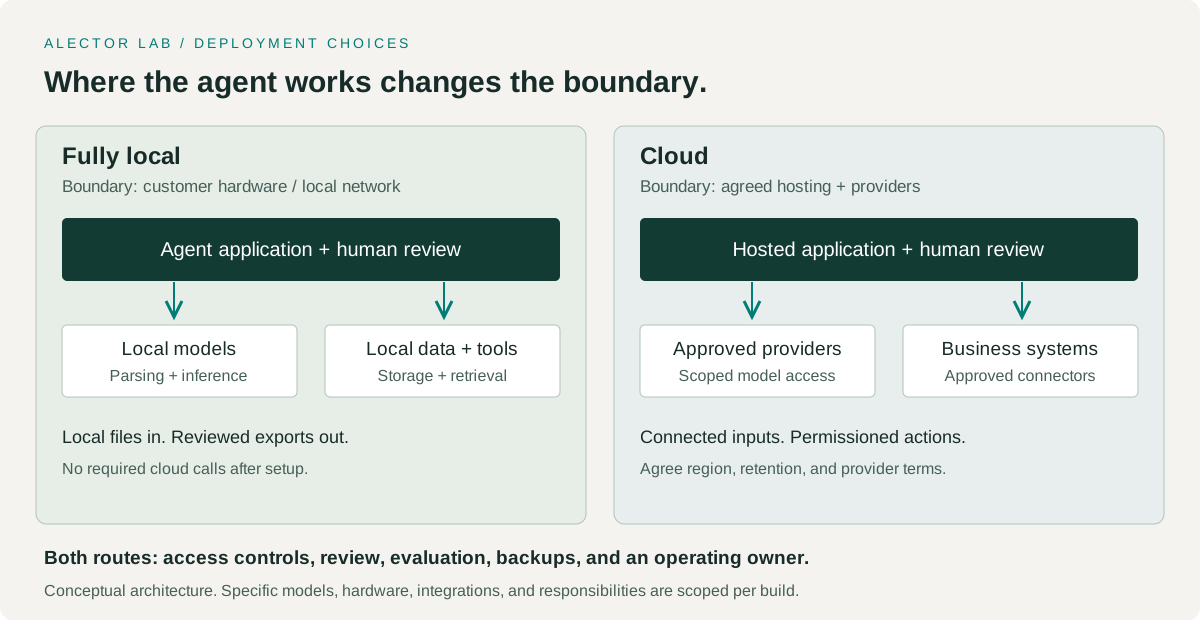
Your workflow.Your deployment. Deployment changes the data boundary, integrations, and operating responsibilities. We scope these before selecting a model.
Fully local Inference, document parsing, speech recognition where needed, retrieval, storage, and tools run on your own hardware. No required cloud calls after installation and model downloads.
Hardware is sized against model, workload, and simultaneous users. Include local backups, access controls, maintenance, and offline update procedures. Use manual imports and local tools. Live CRM, email, and web connections require a separately scoped connected mode. Cloud An agent deployed in an agreed cloud environment with approved model providers and business-system connections.
Agree hosting region, provider terms, data access, and retention before launch. Restrict credentials and tool permissions to the agreed workflow. Budget for hosting, inference, storage, connectors, monitoring, and support. Costs depend on usage and scope. Conceptual deployment boundaries; the final architecture is agreed for your workflow. From idea to an operated system
Start focused.Build with evidence. Every quote defines implementation, integrations, deployment, acceptance criteria, handover, and support. Hardware, provider charges, and ongoing operating costs are identified separately.
Read the business guide 01 Scope the work Choose a process owner, representative examples, and the action boundaries.
02 Prove the fit Test normal work and exceptions against agreed acceptance criteria.
03 Build and integrate Add the interface, permissions, review queue, and deployment package.
04 Launch and operate Roll out in stages with monitoring, handover, and an agreed support plan.
Have a different workflow in mind?
Let’s build the agentyour team actually needs. Discuss your workflow No standard licence price. A clear quote for a defined build.